
The Name Display System Trusted by Singapore’s Leading Institutions
For graduations, award ceremonies, convocations and investitures — every recipient’s name appears on screen the instant they’re called, in perfect sync with the stage and ready for the broadcast. No re-typed slides, no fumbling, no awkward pauses. Just a dignified moment, delivered reliably at scale.
Used by PSB Academy (Coventry University), SMU, Nanyang Polytechnic, LASALLE & more — at up to 2,000 graduands a session.
Trusted by leading institutions
For their most important ceremonies — graduations, national awards, promotions and investitures






What a name display system does
A name display system shows each graduate’s or awardee’s name — with their degree, award or designation — on the big screen at the moment they’re called to the stage, at graduations, award ceremonies, convocations and investitures. Built on Searix’s events platform (used across 10,000+ events), it replaces re-typed slide decks and printed call-sheets with a live, controlled flow.
Pair it with a camera feed and you get a lower-third overlay directly on your live video stream.
It runs standalone or integrated with our RSVP and on-site registration, and — in select markets — our project managers and technicians run it on-site with you. The result is the part of the ceremony nobody should have to worry about: the right name, on screen, on cue.
How it works
A recipient’s journey from arrival to the stage, in one controlled flow.
01 Register & collect a ceremony card
- Recipients scan a pre-distributed QR code or search their name at a registration station — we can run the RSVP beforehand too.
- Each registration prints a ceremony card: their seat details and a personal QR code to keep for the day.
02 Scan into the Stage Queue
- After a final attire check, the QR code on each recipient’s ceremony card is scanned just before they go up on stage.
- This adds them to the live Stage Queue, in the order they are scanned.
- We recommend keeping about five recipients queued ahead.
03 Swipe to call the next name
- The stage manager or emcee works from a control tablet — “On Stage / Next Up” plus the full queue — and simply swipes to call the next name.
- Each called name appears on screen at your desired location, most commonly, the lower-third: on a clean background, or keyed (green-screen) onto your live camera feed and branded stage screen.
- The name and award sit over the recipient on the broadcast — in sync, every time.
04 Last-minute changes, handled
- The stage manager can add, remove or reorder the queue from the tablet for late changes.
- The show-caller can message the emcee through the system, so communication stays seamless without breaking the flow.
All names shown on these screens are fictitious, used for illustration only.
Why institutions and event organisers choose — and stay with — Searix
The software is the easy part. What makes a convocation run flawlessly is the operational know-how around it — and that’s what a decade of ceremonies has built.
Reliability at scale
Thousands of names across weeks of rehearsals and live ceremonies, with broadcast feeds and a packed hall, leave no room for error. Our process is rehearsed and our technicians have done it many times — that confidence is why institutions return.
One controlled source on the night
Once your list is loaded, the whole ceremony runs from it — no parallel slide decks drifting out of sync, no manual re-typing at the lectern.
Designed to protect the flow
We keep live reordering to a minimum and coach a simple on-the-ground process — fit-checks before scanning, a stage-manager final check — so the ceremony moves smoothly.
Run by people who’ve done it
Choose full-service and a project manager plus trained technicians run it on the day; or take the software with training and run it yourself.
The right name — in any language
Singapore and the region bring every kind of name to the stage — and each one deserves to appear exactly as it should.
The system is fully UTF-8: Chinese, Tamil, accented, hyphenated and long names all display correctly, wrapping or auto-fitting on screen.
What’s on screen — configurable to your ceremony
You decide what each recipient’s display shows, white-labelled to your institution’s branding.
- Your fields. Name + degree/designation, name + organisation, or name + organisation + photo.
- Your look. A clean branded background, or keyed onto your live camera feed as a lower-third within your stage graphics.
- Your branding. Backgrounds, fonts, colours and layout configured to your event — no Searix branding on screen.
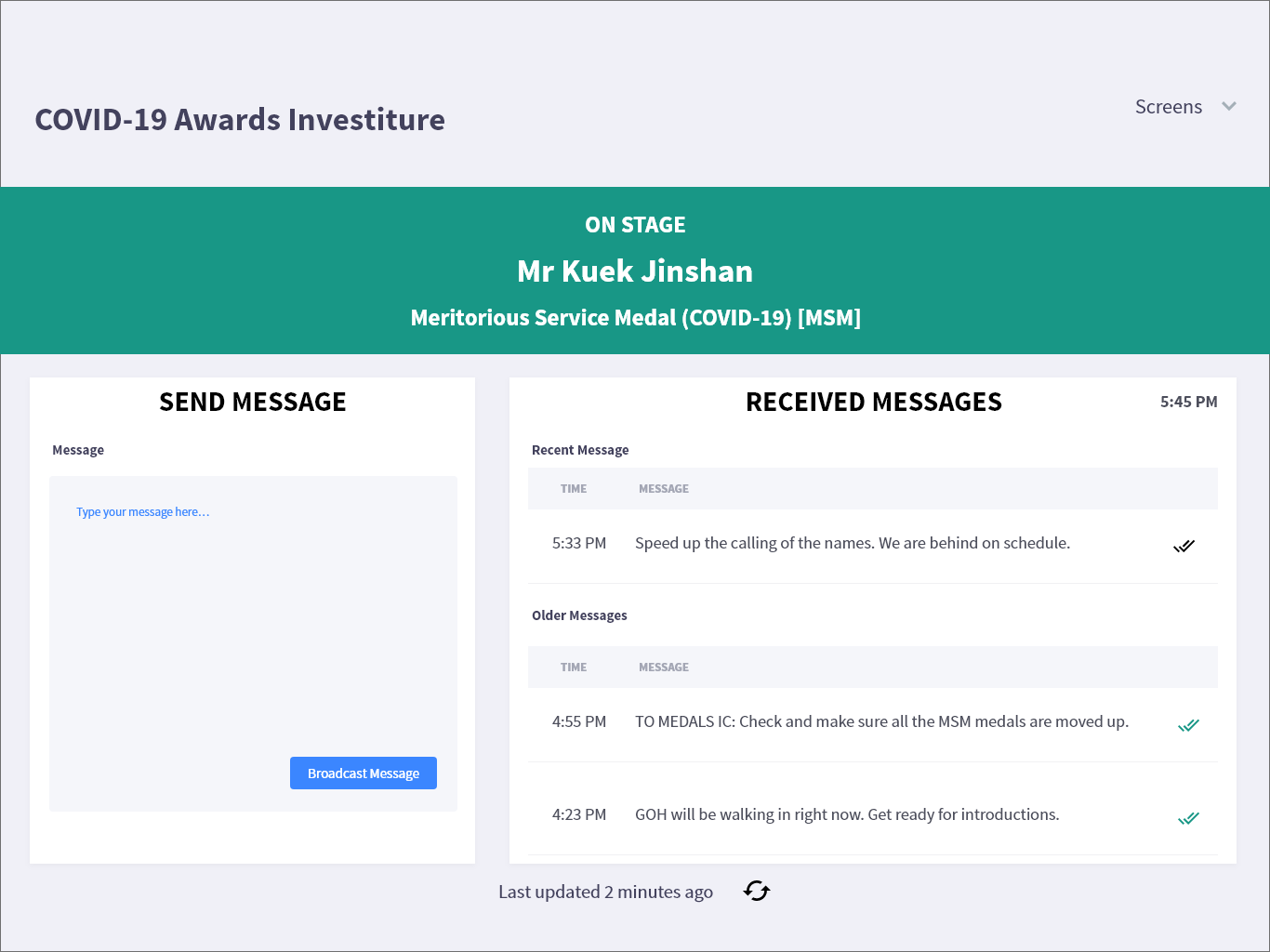
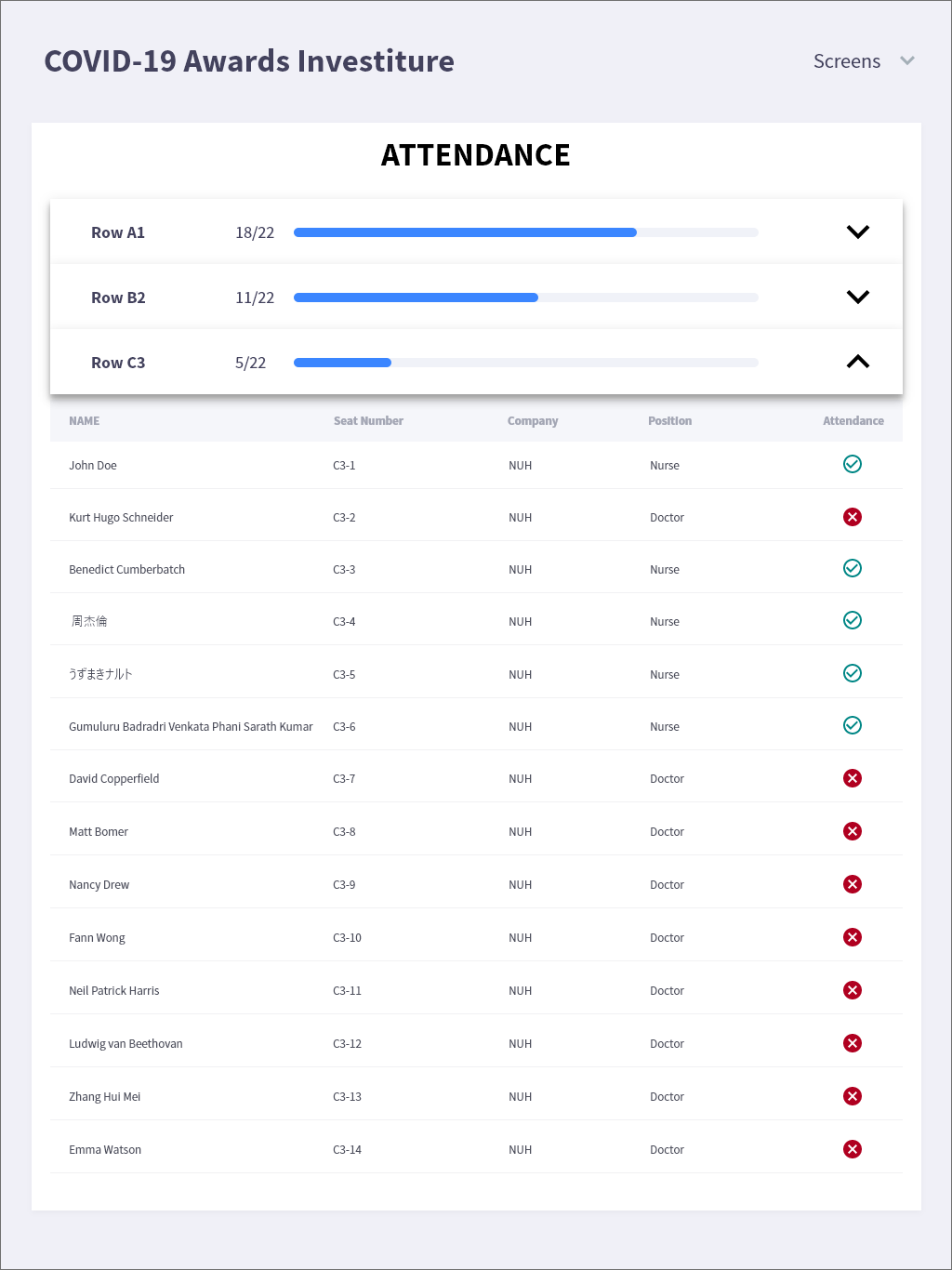
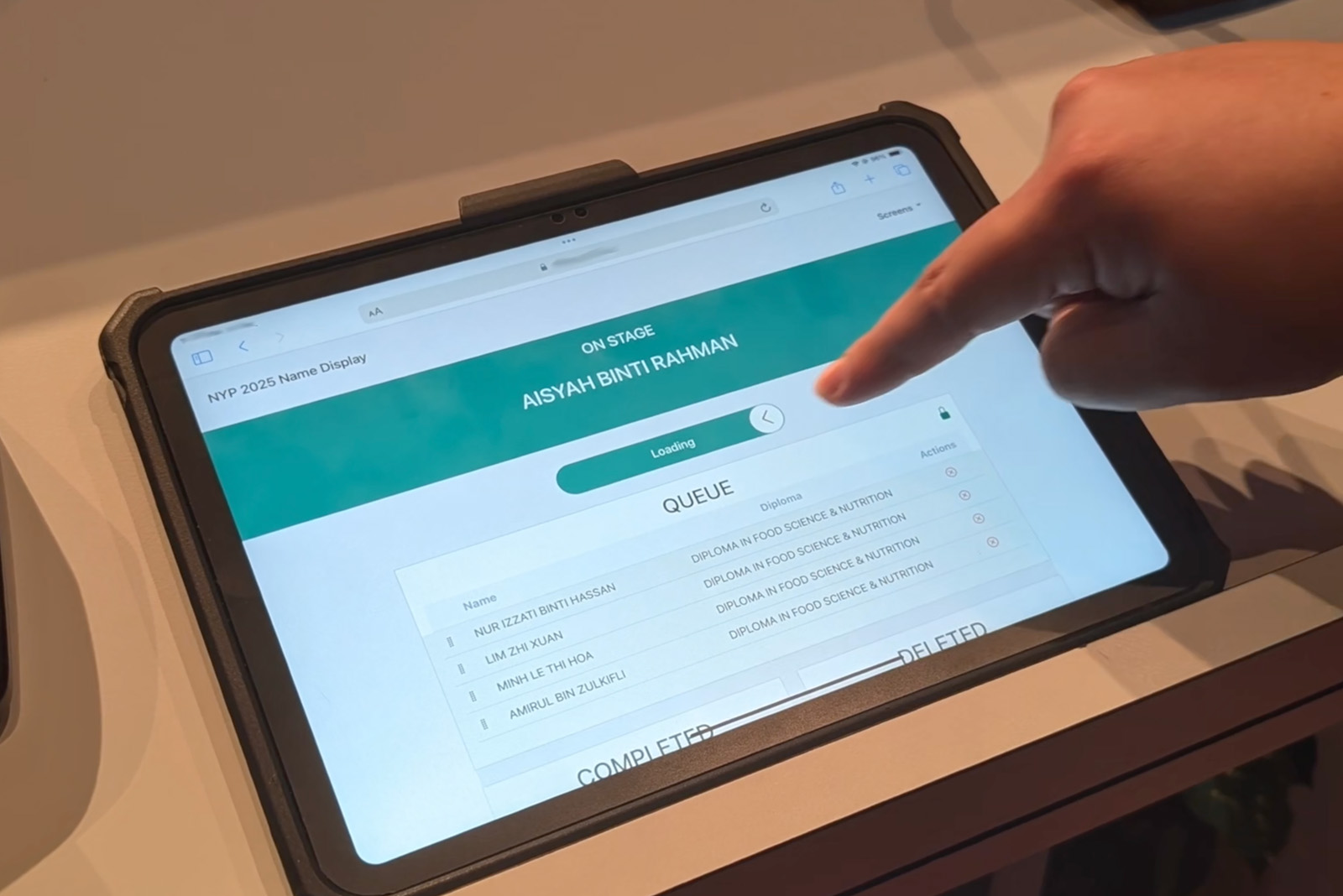
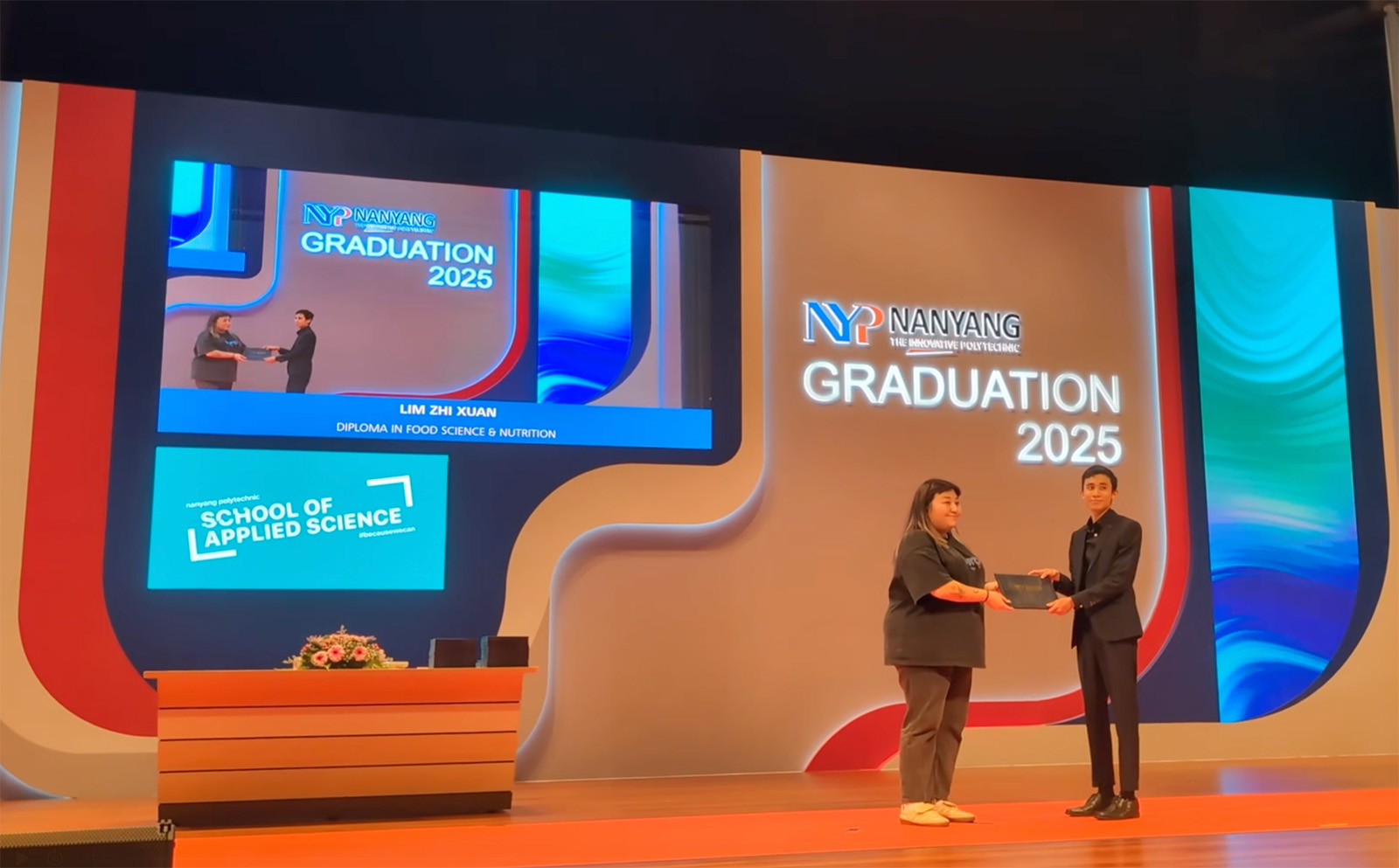
All names shown on these screens are fictitious, used for illustration only.
Running it on-site
An overview of the operational considerations — the things that decide whether the ceremony runs without a hitch.
Scale
Up to 2,000 recipients in a single session; 5,000–10,000 across multi-day rehearsals and ceremonies. The limit is the venue’s time and the ceremony’s pace, not the system.
Full-service or software-only
Full-service brings the hardware, a project manager and on-site technicians; or take the software with training and run it with your own team or AV partner.
Connectivity
Cloud-powered and browser-based, so it needs a stable internet connection at the venue — we recommend the organiser or institution arranges and confirms this with the venue ahead of the event.
Slots into your AV
The name display outputs as a lower-third over a green-screen, which your AV console keys onto the live feed — it feeds into your AV setup rather than replacing it. Confirm the input and keying requirements with your AV vendor beforehand.
Data & PDPA
Consent is captured at registration; recipient data is stored for 7 days after the event date (unless you request otherwise), then permanently deleted, with a CSV export for your office.
Name display system vs manual slides
Most ceremonies still run names off a re-typed slide deck or a printed call-sheet. Here’s the difference.
| Manual slides / printed call-sheet | Searix Name Display System | |
|---|---|---|
| Source of names | Re-typed into slides — error-prone, versions drift | Your verified list, RSVP self-confirmed |
| Calling order | Fixed deck; painful to change on the day | Live scan-to-queue; stage manager reorders on a tablet |
| On screen | A static slide | Lower-third synced to the call — clean, or keyed onto the live feed |
| Last-minute changes | Re-edit the deck mid-ceremony | Add / remove / reorder in the queue instantly |
| Names & scripts | Limited by the slide template | Any script — Chinese, Tamil, Malay, accented; long names auto-fit |
| Scale | Unwieldy past a few hundred | Proven at 2,000+/session, 5,000–10,000 across multi-day |
| On the night | Manual, exposed to human error | Run by a Searix PM + technicians (or your trained team) |
Working with us
Engage us directly or through your AV/event partner. We quote per ceremony.
Full-service
We bring the software, the hardware, a project manager and on-site technicians — a turnkey delivery for your convocation or awards night. Tell us the brief; we run it.
Software + training
License the system and run it with your own team or AV partner; we power the platform and train your operators. The proven tech, without the build.
Your personalised quotation depends on whether you need RSVP, the number of registration stations, the hardware, the project managers, and the number of days / sessions / rehearsals.
Frequently Asked Questions
Common questions about name display for graduations and award ceremonies.
What is a name display system?
A name display system shows each recipient’s name — with their degree, award or designation — on the big screen the moment they’re called to the stage, at graduations, award ceremonies, convocations and investitures. Searix’s runs on a live calling queue: recipients scan a QR code to join the queue, and the stage manager or emcee calls each name, which appears as a lower-third on your screens or keyed onto your live camera feed.
What’s the best name display system for graduation ceremonies in Singapore?
Look for one that’s proven at your scale, slots into your AV/broadcast chain, handles every name and script correctly, and comes with people who’ve run ceremonies before. Searix’s Name Display System is used by leading Singapore institutions — including PSB Academy (Coventry University), SMU, NYP and LASALLE — at up to 2,000 recipients per session and 5,000–10,000 across multi-day rehearsals and ceremonies, available full-service or as software with training.
How does it work on the day?
Recipients register on arrival (scanning a pre-distributed QR or searching their name) and collect a printed ceremony card with their seat details and a personal QR code. After a final attire check, the card is scanned just before they go up, which adds them to the Stage Queue in scan order. The stage manager or emcee then swipes on a control tablet to call the next name, and it appears at the lower-third — on a clean background or keyed onto the live camera feed and your branded stage screen.
How do you make sure the correct name is shown?
The names, degrees and designations come from your verified records, and the system displays exactly what’s loaded — no re-typing on the night. Where RSVP is used, recipients can confirm their own details in advance, which catches errors early. Keeping the master list correct remains the institution’s responsibility.
Can it display non-English or very long names?
Yes. Chinese, Tamil, Malay, accented and hyphenated names all display correctly, and long names wrap or auto-fit rather than truncate.
Can the name appear over our live video feed or broadcast?
Yes. The name displays as a lower-third over a green-screen background, which your AV console keys onto the live camera feed so the name sits over the recipient on the broadcast and your branded stage screen. We recommend confirming the input and keying requirements with your AV vendor beforehand.
How many graduands can it handle?
Up to 2,000 in a single session, and 5,000–10,000 across multi-day rehearsals and ceremonies. The limiting factor is the venue’s time and the pace of the ceremony.
Can we change the calling order at the last minute?
Yes — a stage manager can add, remove or reorder the queue from a tablet. We do recommend keeping live reordering to a minimum (device sync takes a couple of seconds) and using simple fit-checks before scanning, to protect the ceremony’s flow.
Do you run it for us, or do we run it ourselves?
Both. Choose full-service and our project manager and technicians run it on-site; or take the software with training and run it with your own team or AV partner.
How is recipient data handled (PDPA)?
Consent is captured at registration; recipient data is stored for 7 days after the event date (unless you request otherwise) and then permanently deleted. You receive a CSV export of the records for your office.
Which markets do you cover?
Searix runs name display across Singapore and the wider Asia region, direct or through your AV/event-production partner. Share your ceremony and we’ll confirm the setup.

Get a Quote Now
Tell us about your ceremony — the cohort size, the number of sessions and rehearsals, and whether you need RSVP and on-site crew — and our team will recommend the right setup.